I have been a Google and Apple customer for more than ten years. For most of that time I never thought of myself as a customer at all. I thought of these services the way you think about tap water: always there, effectively free, not something you audit.
I still remember when Google Photos offered unlimited storage. Back then I uploaded everything. Photos off my laptop, photos off every phone I had owned, photos off old cameras and memory cards I found in a drawer. Anything with a picture on it got poured into one account, because the storage was free and the app was good and there was no reason I could see not to. It felt less like a decision and more like the absence of one.
When you are young, you do not count the cost
When you are young and living inside the moment, you do not count the cost of any of this. You are not thinking about where the data goes, who can read it, how long it lives, or what it would take to get it back. You are thinking about the trip, the friends, the meal, the view. The collecting happens quietly in the background, and the company on the other end is very good at keeping that background invisible.
It is worth saying plainly what that convenience costs, because I did not understand it at the time. Google Photos was never end-to-end encrypted. The pictures are encrypted in transit and at rest, but Google holds the keys, which means Google can read the contents. That is how the search that finds every photo of a particular face, or a beach, or a birthday cake works in the first place. The same property that makes the product feel like magic is the property that makes it readable by someone other than you. The unlimited “High quality” tier I leaned on, the one that compressed everything a little, ran from 2015 until Google ended it on June 1, 2021. By then the habit was years deep, and the account quietly held more of my life than any single drawer in my house.
I stepped back from the audience
Somewhere in those years I stopped posting photos to social media. There was no dramatic delete-everything moment. I simply lost interest in handing my personal life to an audience of people I would never meet. The pictures that mattered were not performances for strangers; they were mine, and I wanted them to stay that way.
That was the first small turn: from sharing my life outward to wanting to keep it. But keeping it, I had not yet realized, is its own discipline. It is not enough to stop broadcasting your data. You also have to ask where the private copy lives, and who else can reach it.
The story that changed how I think about backups
The turn that actually changed my behaviour came from a story. I came across an account of someone who lost all of their photos from Google Photos after Google terminated their account. Not deleted by accident, not lost to a dead hard drive: closed by the provider, with the photos sealed inside. I sat with that for a while and asked the obvious question. What would have happened to my photos, the only copies of which lived in exactly that kind of account, if the same thing happened to me?
This turns out to be a well documented risk, not a rare one. One of the most reported cases is Andrew Spinks, the creator of the game Terraria. In early 2021 his Google account was disabled without warning, apparently after an automated flag on a linked YouTube channel, and in one stroke he lost the Gmail address he had used for more than fifteen years, along with his Google Drive, his Google Play developer account, and everything else tied to that single login. A full account lock like that is exactly the kind that takes your photos down with it. He spent about three weeks getting nowhere with appeals, then went public and cancelled his game’s launch on Google Stadia in protest. He did eventually get everything back, but only after a month of dead ends, a very public stand, and a wave of press and fans on his side. Most of us do not have a fanbase to summon when a form quietly rejects our appeal.
Spinks got lucky, and it would be easy to treat his story as a one-off. But the structure behind it is ordinary. Google’s own help pages say that for some violations it will review up to two appeals, that an account which stays disabled is “permanently disabled and considered for deletion,” and that for certain categories you may not be able to download your data at all. As recently as early 2026 there were fresh reports of people locked out by automated flags, appeals rejected in minutes, entire accounts and the years of photos inside them gone. I am not telling this story to paint Google as a villain. These were automated mistakes meeting a thin appeals process, not malice. The lesson is narrower and harder to dodge: an account you do not control is a single point of failure, and a single point of failure is not a backup. It is a bet that nothing ever goes wrong on the one copy you have.
So I bought a hard drive
It is almost funny how low-tech the first real step was. After years of treating the cloud as a magic box that remembers things for you, the fix was a physical object I could hold, unplug, and put in a drawer. I bought a portable hard drive and started pulling my photos back down out of Google and copying them onto it, building a second copy that no company could close, suspend, or reach.
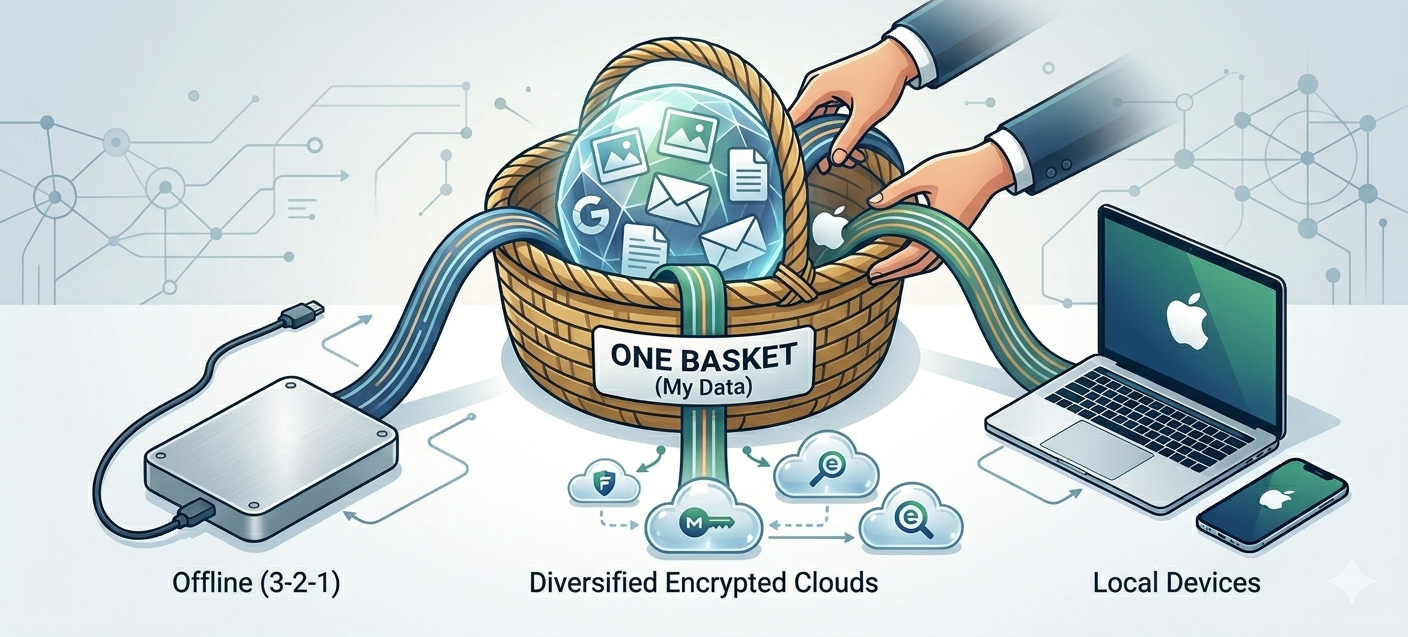
The principle I was reaching toward has a name: the 3-2-1 rule. Keep at least three copies of anything you care about, on two different kinds of storage, with at least one of them kept somewhere separate. By that standard a single cloud account is not a backup at all. It is one copy in one place, dressed up as safety. The hard drive was me finally getting to copy number two, on a different kind of medium, sitting in my own home rather than on someone else’s server.
From one basket to several
Once I started, I could not stop at photos. If a single account could take my pictures with it, the same was true of my documents, and the rule that said “do not keep all your copies in one place” had a sibling that said “do not keep all your trust in one company.” I started experimenting with privacy tools, and two ideas reorganized how I thought about all of it.
The first was diversification. The point was not to find one perfect provider to replace Google. The point was to stop having a single provider at all, so that no one company’s bad day became my catastrophe. The second was end-to-end, or zero-knowledge, encryption. In an ordinary cloud service the provider can read your files, because they hold the keys. In a zero-knowledge service your files are encrypted on your own device before they ever leave it, with a key derived from your password, so the company stores only scrambled bytes it cannot read. The tradeoff is real and worth stating: if the provider genuinely cannot read your data, then the provider also cannot recover it for you. Lose your password without a recovery key, and the data is gone for good. That is not a bug. It is the same property, seen from the other side.
Replacing Google Drive: Filen and Mega
For files, I moved off Google Drive and onto two services instead of one: Filen and Mega. Both encrypt everything on the client side by default, free tier included, so that what lands on their servers is unreadable to them.
Filen is the newer of the two, based in Germany and therefore under European data protection law. Its apps are open source, it publishes its encryption design, and it keeps a warrant canary. It encrypts on your device with keys it says it never sees. The honest caveat is that Filen has not yet completed an independent third-party audit of its encryption, so for now its security is self-described and source-readable rather than externally proven.
Mega is the older and larger one, based in New Zealand, with a fairly generous free allowance and zero-knowledge storage since it launched in 2013. I will be honest about its asterisks, because pretending they do not exist would undercut the whole point of moving for privacy. Mega’s founder, Kim Dotcom, walked away from the company years ago and has publicly said he no longer trusts it, which is a strange thing to read about a service you are about to rely on, even if his claims are his own and now a decade old. And in 2022 a team of cryptographers at ETH Zurich showed weaknesses in Mega’s encryption. The catch is that those attacks require Mega’s own servers to be malicious or compromised, not a passing eavesdropper, and Mega patched the most important one. There is no public evidence anyone was ever harmed by it. I keep Mega in the mix with my eyes open: zero-knowledge by design, but a design whose guarantee still rests on trusting the code the company serves you.
Running both Filen and Mega is itself the strategy. Two providers, two countries, two companies, no single one of which holds everything.
Replacing Google Photos: Ente
Photos were harder, and for one stubborn reason: Google Photos is genuinely excellent. The thing people forget when they tell you to leave a Google product is how good the product often is. I did not just want my photos stored somewhere encrypted. I wanted to keep the experience: the instant search, the automatic albums, the face grouping, the way you can find a photo from four years ago by typing a few words. I tried a few alternatives, and most of them stored my pictures safely and felt like a step back into 2012. The encryption was there; the joy was not.
The one that finally fit was Ente. It is open source and end-to-end encrypted, and crucially it does not make you choose between privacy and the Google Photos experience. Albums, sharing, face grouping, and a natural-language search that actually works are all there, and the clever part is that the machine learning runs on your own device. Your phone builds the search index and recognizes the faces locally, then encrypts that index before it syncs, so the server gets the smarts without ever seeing your photos. Ente has also put its cryptography through an independent audit by Cure53, a firm known for auditing the likes of Mozilla and Mullvad, which is exactly the kind of outside check Filen is still missing.
There is a small, pleasing coincidence in it too: Ente’s engineering team is based in Bengaluru, the city I work from. The same team also makes a free, open-source two-factor authentication app called Ente Auth, which I picked up almost as a side effect. Ente became my Google Photos, minus the part where one company can read everything and close the door.
There is also the everyday side of photos, the live camera roll, which for me lives in the Apple ecosystem. My iPhone syncs to iCloud Photos, and I have turned on Apple’s Advanced Data Protection, which extends end-to-end encryption to iCloud Photos so that even Apple cannot read what is stored there. The usual trade-off applies: with that protection on, Apple can no longer recover the library for me if I get locked out, so the responsibility for the recovery key quietly moves to me. On my MacBook Pro the only thing I keep out of the cloud is the Photos app: I have its iCloud sync deliberately switched off, which leaves a full photo library living locally on the machine and never touching the cloud. Everything else, my documents and files, still syncs through iCloud Drive, which the same Advanced Data Protection covers with end-to-end encryption, so this is not a blanket distrust of iCloud. It is simply a way to keep one copy of my photos that lives nowhere but the laptop. Between the phone and the laptop I get the convenience of everywhere-sync and a separate offline copy of my photos, and Ente sits alongside both as the independent archive that belongs to neither Google nor Apple. For the data I would least like to lose, that is several baskets for the price of a little extra care.
Email is the hardest basket to move
That left email, and I want to be honest that I have not finished this one.
Email is the most personal data most of us own. It is not just messages. It is the password reset link for every other account, the receipts, the tax documents, the boarding passes, the quiet record of who you talk to and when. If photos are your memory, email is your identity, and it is the single richest thing a stranger could find. It is also the stickiest to move, because your address is wired into hundreds of other services.
I still use Gmail. I also use iCloud, and I have been experimenting with other providers, with one specific requirement: I want my mail to sync cleanly with the Mail app on my Mac and iPhone, the way I actually read and write it. That requirement is where my experiment with Proton Mail ran aground. Proton is a serious, Swiss-based encrypted provider and I have real respect for it. But two things got in the way for me. The first is that some services treated mail from a privacy provider with suspicion: messages landing in spam, or a signup form rejecting the address outright. A good part of that is fixable, and it is rarely about the word “Proton” itself. A new sending domain has no reputation yet, and mail gets filtered until authentication records like SPF, DKIM, and DMARC are configured and a sending history builds up. Proton itself points out that abuse from its users is no higher than from Gmail or Yahoo. Still, situational or not, when a one-time password or an invoice lands in someone’s spam folder, it is a real problem in my real life. The second issue was more practical: getting Proton into Apple Mail at all requires a separate piece of software called Proton Bridge, which only runs on the desktop and is not available on iPhone, so the clean native Mail sync I wanted was not really on offer.
One path that does sync natively is an iCloud+ custom domain: bring your own domain name into iCloud Mail and read it in Apple Mail everywhere, with one quirk worth knowing, which is that an address you add this way can no longer be used to sign in to your Apple Account, even later. More generally, any provider that speaks plain IMAP drops straight into Apple Mail without a bridge in between. For now my email is the unfinished room in the house: spread across Gmail and iCloud and a couple of trials, none of it as private as my files or my photos, all of it still a work in progress. I would rather admit that than pretend I have solved the hardest part.
Where my data lives now
So here is the shape of things now, a few baskets instead of one. Files live in Filen and Mega, two encrypted providers in two countries. Photos are the most spread out of all: my live camera roll syncs between iPhone and Mac through iCloud Photos with Advanced Data Protection switched on, a local-only library sits on the MacBook with cloud sync disabled, Ente holds the independent encrypted archive, and a portable hard drive at home keeps the cold, offline copy that no provider can reach. Email is still in motion across Gmail, iCloud, and a few experiments, the one basket I am still rebuilding. It is not the tidiest setup, and it asks a little more of me than letting one company hold everything did. That is the cost, and I have decided it is worth paying.
What this is really about
The honest version of this post is not really about Mega versus Drive or Ente versus Photos. The specific services will change; some of them will get better and some will let me down, and I will swap them the way you replace a worn part. What I am actually trying to do is refuse a single point of failure for my own life.
For more than ten years I let two companies hold my memories, my documents, and my identity, and I called it convenience, because it was. The convenience was never the lie. The lie was the quiet assumption underneath it: that the one copy, in the one account, would simply always be there, and that the company holding it would always decide in my favour. The developer who lost his Terraria account believed the same thing, right up until his login was disabled overnight and three weeks of appeals went nowhere. He got it back only because enough people noticed. Most of us would not be that lucky.
I am not trying to disappear, and I am not pretending to have escaped Big Tech. I still use plenty of it. I am just no longer willing to keep everything that matters in one basket, in a house whose locks I do not own, trusting that the door will never close. I noticed the same thing when I chose a watch that has nothing to surveil with: privacy is easiest when it is the default shape of the thing, not a feature you bolt on afterward. Spreading my data out, encrypting it where I can, and keeping one copy I can physically hold is my way of making the safe choice the default one. The goal was never perfect privacy. It was simply to make sure that no one else’s bad day can quietly erase mine.